Video has become the default format for marketing, education, social media, product storytelling, and brand communication. The problem is that demand keeps rising while production time rarely gets any easier. Many creators still have to move between separate tools for scripting, visuals, voice, music, editing, and asset management. That is why an AI Video Maker is no longer just a nice-to-have tool. It has become a practical way to shorten production cycles and turn ideas into publishable content faster.
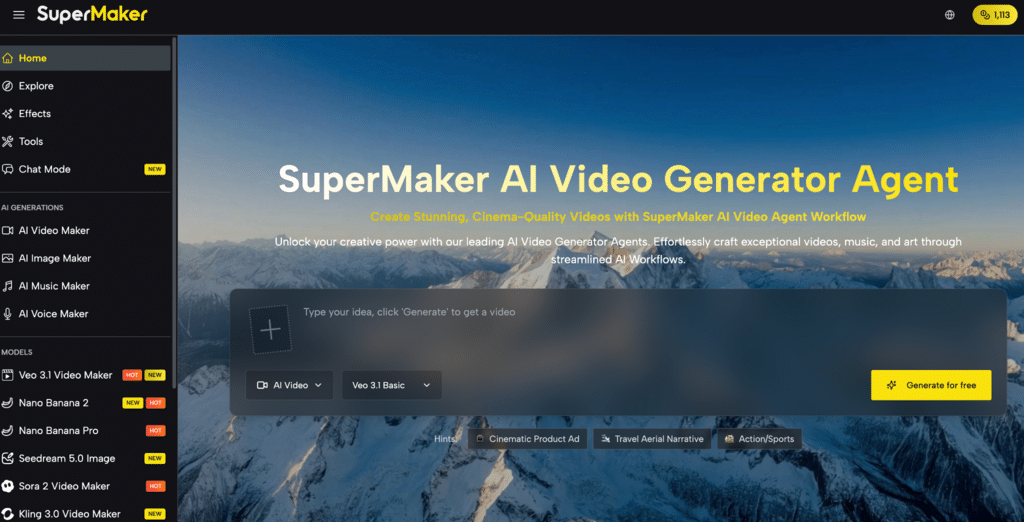
If you want one platform that combines video generation, images, voice, music, and workflow tools in the same place, SuperMaker is a strong option to consider. SuperMaker presents itself as an all-in-one AI creation platform available on web and mobile, with support for multiple video models and an integrated creation workflow from concept to final output.
Contents
The Core Pain Points for Today’s Video Creators
Today’s creators are expected to publish more, test more, and adapt content for more channels than ever before. But the production process is still full of friction.
- Tool fragmentation Many creators still need one tool for visual generation, another for voiceover, another for music, and yet another for organizing files. That slows execution and makes every revision harder to manage. SuperMaker’s positioning is built around reducing this exact problem by putting video, image, voice, and music tools into one platform.
- Slow production cycles Even short-form videos can take too long when the workflow includes prompt writing, asset gathering, editing, syncing, exporting, and revision. SuperMaker specifically highlights one-click storyboard generation, integrated voiceover, lipsync, sound effects, and editing as part of a faster workflow.
- Creative inconsistency It is not enough to generate one good clip. Teams and creators need visual consistency across scenes, subjects, and formats. SuperMaker emphasizes character consistency, style control, and structured workflows rather than one-off generation only.
- High skill barriers Many users have good ideas but limited experience with editing, motion design, sound design, or post-production. SuperMaker’s interface and prompt-driven workflow are presented as a way to lower that barrier for beginners and speed up production for experienced users.
- Commercial usability concerns For brands, agencies, and freelancers, output quality is only part of the decision. They also need to know whether the videos can be used in real business work. SuperMaker states that videos generated under its premium plan come with full commercial rights.
Why SuperMaker Works as an AI Video Maker
For readers comparing tools, the key question is simple: what does this platform actually help you do better? In SuperMaker’s case, the answer is not just video generation. The biggest value is that it treats video creation as part of a broader production system.
For anyone who wants a flexible and scalable solution, Supermaker AI Video Maker is built around an all-in-one workflow that combines Text-to-Video, Image-to-Video, AI Image Maker, AI Voice Maker, AI Music Maker, and an AI Chat Interface for idea development and creative guidance. Instead of forcing creators to switch platforms at every stage, it keeps more of the process inside one workspace.
Feature Highlight 1: All-in-One AI Creation
One of SuperMaker’s clearest strengths is breadth. The platform is not positioned as a single-model generator. It combines video, image, music, and voice tools in one product, and its app page also highlights access across web and mobile. That makes it more useful for creators who need complete content packages rather than isolated clips.
Feature Highlight 2: Workflow from Concept to Final Cut
SuperMaker describes a complete video workflow that includes storyboards, voiceover, lipsync, sound effects, and editing. This workflow-first approach is one of its most important differentiators, because many AI video products are strong at generation but weaker at project assembly and finishing. For creators who need publishable output rather than just raw clips, that matters.
Feature Highlight 3: Model Variety and Practical Output
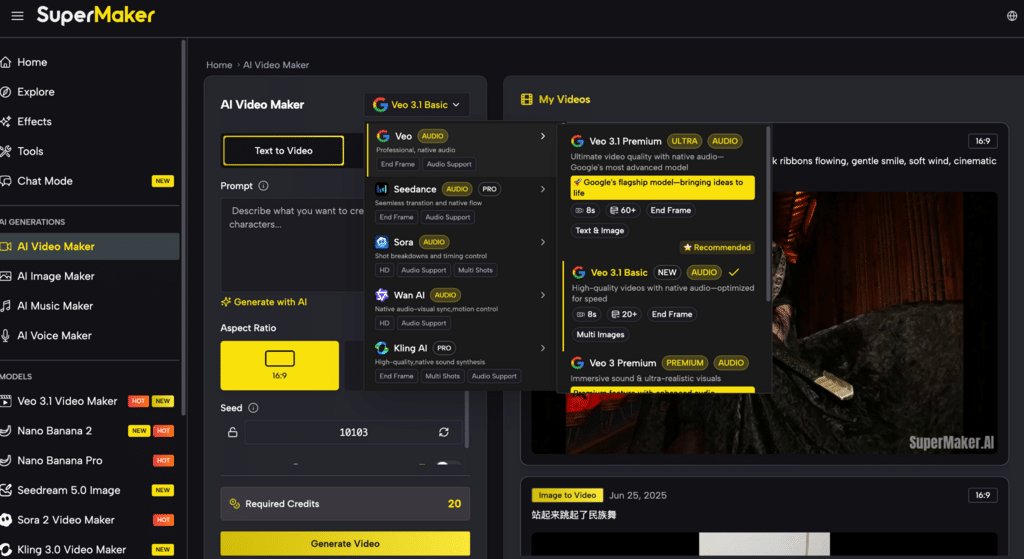
SuperMaker’s video ecosystem includes access to multiple major model families such as Sora, Veo, Kling, Wan, and Seedance, rather than locking users into a single generation engine. On its pricing page, SuperMaker lists models including Veo 3.1 Premium and Sora 2 Pro in paid plans. That multi-model setup gives creators more flexibility when they need different looks, styles, or strengths for different projects.
How to Use an AI Video Maker More Effectively
A strong AI tool still works best when the workflow is simple and repeatable. Here is a practical approach based on how SuperMaker structures its product.
Beginner-friendly workflow
- Start with an idea or source visual Use Text-to-Video if you are building from a written concept, or Image-to-Video if you already have a reference image or still frame. SuperMaker’s video page supports both paths.
- Shape the narrative direction Use the platform’s AI Chat Interface and storyboard-oriented workflow to turn a rough idea into structured scenes. This is especially helpful for explainers, social content, and short branded videos.
- Add voice and music Build a more complete piece by using AI Voice Maker and AI Music Maker within the same ecosystem. This reduces the need for outside audio tools and speeds up iteration.
- Refine and organize assets Use SuperMaker’s built-in editing and asset management features to store versions, keep projects organized, and make future reuse easier.
Common application scenarios
- Marketing teams create ad concepts, product promos, and campaign assets faster.
- Content creators testing hooks, visual ideas, and short-form content before full production.
- Educators and explainers converting text-heavy ideas into more engaging visual formats.
- Freelancers and agencies who need broader commercial workflows rather than single-use clip generation.
AI Video Maker Comparison and Buying Advice
A good comparison section helps both readers and search engines understand where your product fits.
| Tool | Core Advantage | Best For | Free Version |
|---|---|---|---|
| SuperMaker | All-in-one workflow with video, image, voice, music, storyboarding, and editing | Creators, marketers, agencies, and teams that want one platform for end-to-end production | Yes |
| Runway | Mature creative toolset and advanced generation workflows | Creators focused heavily on dedicated video tooling | Yes |
| Pika | Fast experimentation and effect-driven generation | Social creators and quick ideation | Yes |
| Canva | Familiar design ecosystem with AI features | Teams already working inside Canva | Limited |
The main decision comes down to workflow needs. If a user only wants isolated clip generation, a narrower tool may be enough. But if the goal is to create videos alongside images, voice, music, and reusable assets in one environment, SuperMaker’s all-in-one structure is its strongest advantage. That is also why it compares well against tools that require extra subscriptions for audio or supporting content workflows.
Final Thoughts
The AI video space is crowded, but the real difference between tools is no longer just whether they can generate clips. The bigger question is whether they can reduce production friction across the full creative process. SuperMaker’s value is that it combines video generation, image creation, voice, music, model choice, and workflow support in one place rather than forcing creators to patch together multiple tools.
If you are looking for an AI Video Maker that feels more like a practical creation studio than a single-purpose generator, SuperMaker is worth trying for your next project.